
|
|||||||


| View Poll Results: How many of you really want Landscape mode? | |||
| I really need Landscape!! |
   
|
142 | 60.94% |
| I don't really need Landscape!! |
  
|
91 | 39.06% |
| Voters: 233. You may not vote on this poll | |||
 |
|
|
LinkBack | Thread Tools | Display Modes |
|
|
 07-31-2008, 05:10 PM
|
||||
|
||||
|
Re: Touch Diamond Theme WAD2!!!!
Quote:
Wow. Did you read any of this thread? Particularly a few posts up when your first problem could have simply been resolved. As for the errors you have to actually edit the program and set it up to your specific device. If you dont know how, or feel comfortable doing it i would say uninstall and wait for the real thing.  Now playing: Terror Squad - Bring'Em Back via FoxyTunes </div> |


|
07-31-2008, 05:51 PM
|
||||
|
||||
|
Re: Touch Diamond Theme WAD2!!!!
I'm having issues with this theme. Maybe I'm not doing the correct things. I have read through these posts twice now. There don't seem to be any instructions on how to setup the themes or app.
I have a XV6700 WMD6.1 I installed WAD2 first (paid version) then WA3 (paid version) then Diamond themes cab file All went well with the install all the files are where they are suppossed to be per the posts. Now I have a black diamond backgroud on my 6700 when I tap and hold it I get nothing. No dropdown, no way to change settings ect. The only way I can change that is if I get to the WAD2 desktop theme and then I'm able to get the dropdown and change the settings Question is how does this work?? Do I use WAD2 to set everything up and then turn on the diamond theme? or is everything suppossed to work through the diamond them?? Yes I have un-installed and re-installed several times. I have installed everything form the first post. Other then the setup.txt for setting up people page ther are no step by step instructions to set this up! I love this theme and Jdume put some hard work to create it but I can't seem to figure it out. I just want the same setup as the below pic 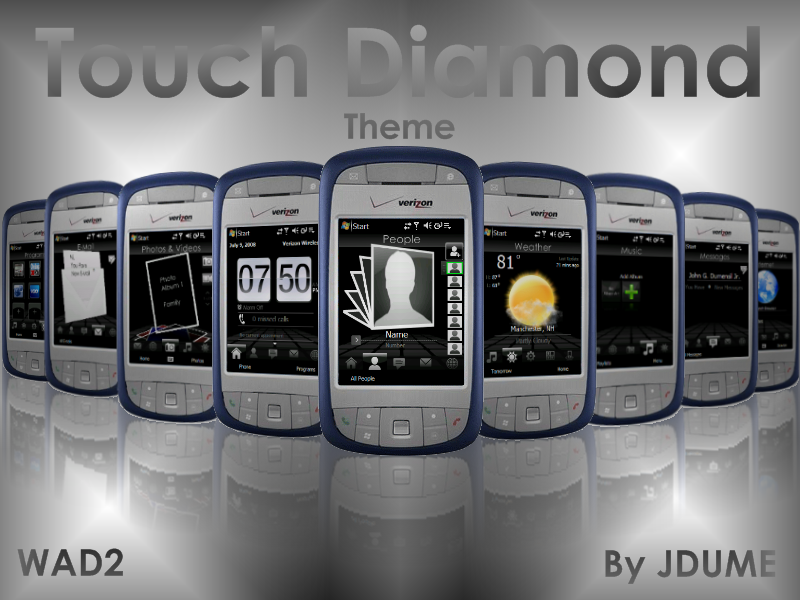
|

|
07-31-2008, 06:20 PM
|
||||
|
||||
|
Re: Touch Diamond Theme WAD2!!!!
Quote:
This theme has been really easy for some and extremely difficult for others. I have installed and deleted this theme at least 20 times and have seen almost all the difficulties many of you have had and the easy installs also. The easiest way I have seen to do this install is to use the cab file. But it does not always wont 100%. So after the cab install you still may need to copy the lakeridge folder. Follow the instructions. Dont assume and dont change. Use WADRC4. dont use your purchased software etc.... Use exactly what Jdume has given you. I have had extreme difficulities with my purchased software and have yet to get theme to work. Start out getting the theme to show up first and then work out your own problems. This theme does work and it works great. It just takes time to setup. Here is a short step by step 1. Hate to say it but if you really want to test this. Backup everything and do a hard reset. 2. Install the WA3 and then WAD2. 3. Install the cab file 4. Take the lakeridge folder that was provided in the zip file and copy it to start\programs\file explorer\mydevice\program files 5. Do a soft Reset All should be well... |
|
08-01-2008, 02:19 AM
|
||||
|
||||
|
Re: Touch Diamond Theme WAD2!!!!
Quote:
 :headb ang: :headb ang:So I ditched the paid for WA3 and WAD2. I used the beta versions provided. Installed in the order you said which is different then what Jdume wrote. So now the theme is installed and I'm moving through the pages. I am getting errors when I go to the messages page and click on he small messages icon at the right top. I get the same error when I go to th email page and click on the email icon. The error is Shortcut target: "Error opening the shortcut or locating the target filename." I will need to look through the posts see if there is an aswer....I think I saw a fix for this. Too late now Thanks for the help No_PaRoLe -Grogster |
|
08-01-2008, 08:24 AM
|
||||
|
||||
|
Re: Touch Diamond Theme WAD2!!!!
Quote:
But I could not understand why you paid for a version of WAD when in the first post I clearly stated the WAD2 is still in BETA witch means testing stages and that means FREE. Make sure you keep your purchased codes because you can use it for WAD themes visit my website, its still in the process of being built but there is a fue things on there its dedicated to themes and skins only so everyone check it out!!!www.pimpurpocketpc.synthasite.com
__________________
PIMPURPOCKETPC.COM
OFFICIAL TF2D SKINNING THREAD WM6.5 Titan Kitchen WM6.5 Dialer If you like my work or if I helped you and would like to buy me a cup of coffe click HERE |

| This post has been thanked 3 times. |
|
08-01-2008, 11:18 AM
|
||||
|
||||
|
Re: Touch Diamond Theme WAD2!!!!
Quote:
The above was for shortcuts or icons on the screen. These instructions are for those tough item on the bottom of the screeen on the dock. Again tap and hold the screen. Go into author mode. Again tap and hold on the screen (not an icon). Click page and then properties. Click softkeys and then edit script. Click launch a program and then edit. Select which program you want to launch..... |
|
07-31-2008, 06:32 PM
|
||||
|
||||
|
Re: Touch Diamond Theme WAD2!!!!
Grogster,
To answer the second part of your question. There really is no more that has been written as a help file. Everyone here that has been successful in getting the contact and programs working have pretty much experimented themselves. The setup.txt the JDume posted really is helpful and it explain alot. But the Key is learning the different feature of the program and not the Theme itself. When you tap and hold on the screen - the new shortcut is the key to alot. You also have to know what the sub-categories do. Example: New -- Text -- Custom Text All this does is allow you the make a custom txt box. But once the custom txt is made, you can do much more with it. Example: At the bttom of the custome txt box setting page you will se Script. You can setup that box to run a program, dial number and multiple things just by touch. The above 2 examples are the keys to your contacts pages.... Many are not noticing the small arrow symbol after you press one off the contact items on the right. This runs a script that opens up a drop down list. You can place custom text boxes on that drop down list. It only needs to be a phone number with a script to dial the number. If you notice to the left there is a small picture that looks like an up and down arrow. This pushes the box back in..... Play with it. If you totally screw it up you can just copy that part of the theme back without screwing the rest of it. Just go the the folder you extracted on the computer and look for Page_people. Copy that to the appropriate folder and soft reset. Start all over again... Hope this helps a little. |
|
07-31-2008, 10:36 PM
|
||||
|
||||
 Re: Touch Diamond Theme WAD2!!!!
This theme rocks...What worked for me might work for you... I have the touch and first i installed the apps that go with the theme,then opt.apps when asked to restart press continue,then add desktop,then advance,then cab diamond theme soft reset,and your almost done...give it a try
|
|
08-01-2008, 09:41 AM
|
||||
|
||||
|
Re: Touch Diamond Theme WAD2!!!!
Am working on tweaking the theme and did a boo boo. I chose "Hide Dock by Default" and now on my home page the only icon on the bottom is the home icon. How can I get the other icons back? I tried clicking where the icons used to be but cannot see that option.
Also, has anyone run into the issue where the clock stops moving and only after a soft reset does it go back to the right time? Thanks again for everyone's input and am looking forward to jdume's site to be completed. |
|
|
«
Previous Thread
|
Next Thread
»

 Hybrid Mode
|
|

All times are GMT -4. The time now is 07:01 AM.


