PPCGeeks Forums HTC Arrive HTC HD2 HTC Thunderbolt HTC Touch Pro 2 HTC Evo 4G HTC Evo 3D Samsung Galaxy S II Motorola Droid X Apple iPhone Blackberry
Go Back   PPCGeeks > Windows Mobile > Windows Mobile Hacks/Tweaks > Titanium Tweaks
Register Community Search

Notices


LinkBack Thread Tools Display Modes
Prev Previous Post   Next Post Next
  #4 (permalink)  
Old 04-18-2009, 11:03 AM
jaycee1981's Avatar
Lurker
Offline
Pocket PC: Htc touch Hd
 
Join Date: Apr 2009
Posts: 9
Reputation: 15
jaycee1981 is a n00b
Mentioned: 0 Post(s)
Tagged: 0 Thread(s)
Re: CHome/Titanium Modifications

Quote:
Originally Posted by Hafrust View Post
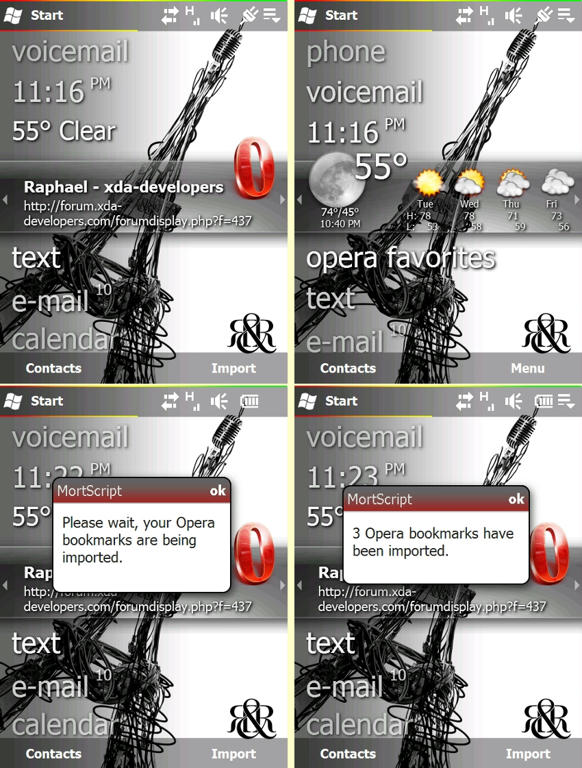
FYI....Showaco has posted an Opera panel cab that is in testing stages. Check it out here. I'm not going to post the cab since it's still listed as "for testing". I installed it on my phone and it works fine, but it has not been tested on all versions of Opera. QVGA users can find info on how to get this working on your device in this post (thanks to drkfngthdragnlrd). Here's a peek:


I just installed them on my htc touch hd, followed the instruction, works like a charm! Thanx!

Can someone tell me please:

There is Music--> if i touch it, it starts to run Windows media player. Well i hate WM to be honest

How can i change it to Htc Manila's built in Music player?

I use Miri's cooked rom, so i have manila as well on my device.

Thanx in advance!
 

  PPCGeeks > Windows Mobile > Windows Mobile Hacks/Tweaks > Titanium Tweaks


Posting Rules
You may not post new threads
You may not post replies
You may not post attachments
You may not edit your posts

BB code is On
Smilies are On
[IMG] code is On
HTML code is Off
Trackbacks are On
Pingbacks are On
Refbacks are On


All times are GMT -4. The time now is 09:06 PM.


Powered by vBulletin® ©2000 - 2026, Jelsoft Enterprises Ltd.
Content Relevant URLs by vBSEO 3.6.0
©2012 - PPCGeeks.com