


|
|
 09-17-2009, 11:54 PM
|
||||
|
||||
|
Re: TP2 Copy And Paste?
I've noticed that you can't highlight text thats in text message view anymore i.e., hold the stylus on the screen and highlight what you want, it only allows you to select all and copy.

|


|
09-17-2009, 11:56 PM
|
||||
|
||||
|
Re: TP2 Copy And Paste?
Quote:
|


| This post has been thanked 2 times. |
|
09-17-2009, 11:58 PM
|
||||
|
||||
|
Re: TP2 Copy And Paste?
Quote:
|
| This post has been thanked 1 times. |
|
09-18-2009, 06:06 AM
|
||||
|
||||
|
Re: TP2 Copy And Paste?
Sometimes certain text fields doen't allow you to copy highlighted text from them. On the TP1, I would just use Ctrl-C and it would work anyways. I guess for the TP2, you have to use the standard WM keyboard

__________________
|
![[sammich]'s Avatar](https://forum.ppcgeeks.com/customavatars/avatar16583_4.gif)

|
09-18-2009, 06:09 AM
|
||||
|
||||
|
Re: TP2 Copy And Paste?
i asked a similar question yesterday. my HTC Mogul could highlight, copy, and paste on virtually any screen. the TP2 looks better, but takes away that functionality.
|
|
09-18-2009, 06:35 PM
|
||||
|
||||
|
Re: TP2 Copy And Paste?
Quote:
|
|
09-18-2009, 07:08 PM
|
||||
|
||||
|
Re: TP2 Copy And Paste?
Here's what I did on my phone :
I've install KbdControl on my TP2 (http://forum.xda-developers.com/showthread.php?t=554240) and I remap the "email" key on the keyboard to a Ctrl key. Telus TP2 has a email button which is totally useless IMO. I remap that button but you can remap any button you'd like ! Now, I just have to press "email" + C or "email" + V ... and there you go ! Got Copy and paste everywhere !! It is working very very good  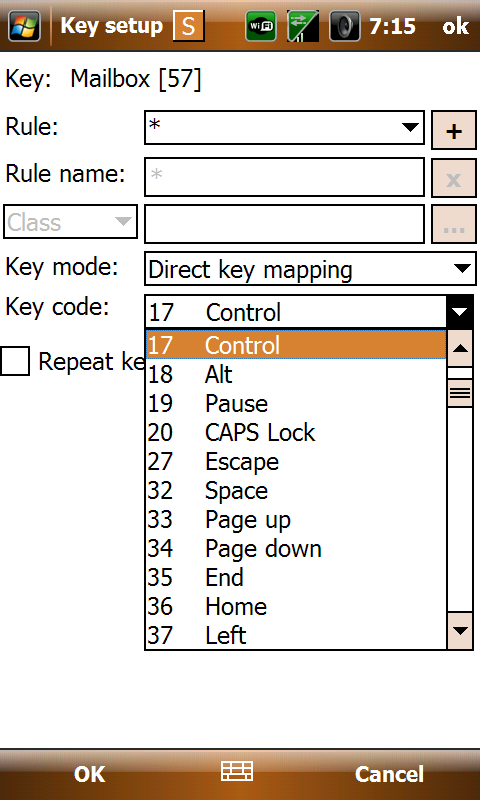
__________________
TELUS Desire HD is now mine... and it feels good  Last edited by vakbrain; 09-18-2009 at 07:33 PM.
|

| This post has been thanked 6 times. |
|
09-18-2009, 09:01 PM
|
||||
|
||||
|
Re: TP2 Copy And Paste?
Quote:
I hated not having a CTL key on the Telus TP2.
__________________
Current: Samsung O2 I8000L (Alex823 JI1 Lite)
Old: Touch Pro 2 / Touch Pro / Treo Pro / So on, so on... 
|

|
09-18-2009, 07:15 PM
|
||||
|
||||
|
Re: TP2 Copy And Paste?
in messages to highlight only a few, the tmobile tp2 other than having the ctrl button, theres a select messages/several just hit menu, select messages and several...... and just touch each one ya want untill ya highlighted all ya want, then delete or whatever ya wanna do
__________________
S-Vibrant
(Hummingbird FTW)
|

| This post has been thanked 1 times. |
|
10-02-2009, 02:41 AM
|
||||
|
||||
|
Re: TP2 Copy And Paste?
EVEN BETTER way to do it with the Keyboard controller/config:
You don't "Need" to map a CTRL key, because you can emulate pressing a key WHILE pressing another key. In other words: Take your C key, map "default function" to single click, but map "emulate keypress" for LONG press, and then for the key to emulate check CTRL and "C". That way when press and hold C it will copy automatically! Repeat for X and V etc. Also I made a tab key via FN->SYM, and pressing FN->LEFT or RIGHT will skip a word. If you don't understand any of this or just want to see it, here's my Keyboard Controller XML config file: (coulldn't attach an XML file here so I'm hosting it off my site) http://protonus.ws/files/ppc/KeyboardConfig.xml Just load this up and you can see all I've done, I've mapped a lot. I have some mapping for the AEButtons Task Manager and Mem Viewer as they're my favorite so install AEButtons to take advantage of that (you don't have to have it in startup though).
__________________
Hit me up with that  giving. giving.Verizon Samsung Fascinate (Galaxy S) Clie -> Clie TG50 -> XV6800 -> Touch Pro2 -> Fascinate
|


| This post has been thanked 1 times. |
 |
|
«
Previous Thread
|
Next Thread
»

 Hybrid Mode
|
|

All times are GMT -4. The time now is 06:11 PM.


