PPCGeeks Forums HTC Arrive HTC HD2 HTC Thunderbolt HTC Touch Pro 2 HTC Evo 4G HTC Evo 3D Samsung Galaxy S II Motorola Droid X Apple iPhone Blackberry
Go Back   PPCGeeks > Windows Mobile > WM HTC Devices > HTC Touch Pro > CDMA TP Development
Register Community Search

Notices


LinkBack Thread Tools Display Modes
Prev Previous Post   Next Post Next
  #11 (permalink)  
Old 11-12-2009, 07:53 PM
rootlinux's Avatar
The Rootinator
Offline
Pocket PC: HTC EVO 3D, HTC EVO 4G LTE, HTC ONE
Carrier: Sprint
Location: Chattanooga
 
Join Date: Jul 2009
Posts: 4,992
Reputation: 9270
rootlinux is a trusted member of the communityrootlinux is a trusted member of the communityrootlinux is a trusted member of the communityrootlinux is a trusted member of the communityrootlinux is a trusted member of the communityrootlinux is a trusted member of the communityrootlinux is a trusted member of the communityrootlinux is a trusted member of the communityrootlinux is a trusted member of the communityrootlinux is a trusted member of the communityrootlinux is a trusted member of the community
Mentioned: 4 Post(s)
Tagged: 0 Thread(s)
Re: EmpiROM - Featuring TellMe & WM6.5.1 - Fast, Stable, Sleek. For Touch Pro.

Quote:
Originally Posted by hamidxa View Post
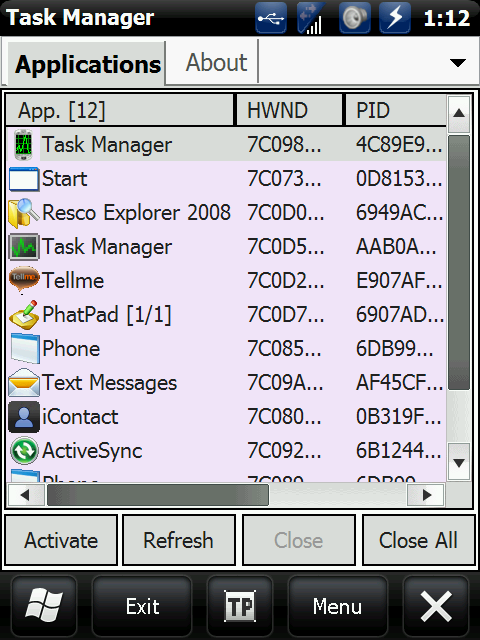
By default task manager in WinMo, I'm assuming you mean this one:


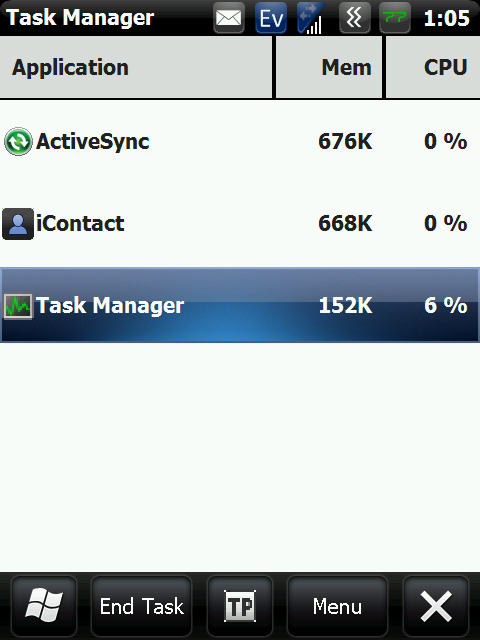
taskmgr however (the oft forgotten about task manager) is nothing like the above one:


In terms of finger-friendliness of course -- there's a night and day difference between the 2.

taskmgr is essentially much like Showcase as far as finger-friendliness goes, but without all of the quirks that makes Showcase frustrating to use at times.


Also once more, the RAM consumption on taskmgr is between 150-170K.
It does NOT go above that, and CPU usage while running it throttles between 0-1%, it only spiked to 6-7% the very moment the screenshot was taken, then went back down to 0-1%

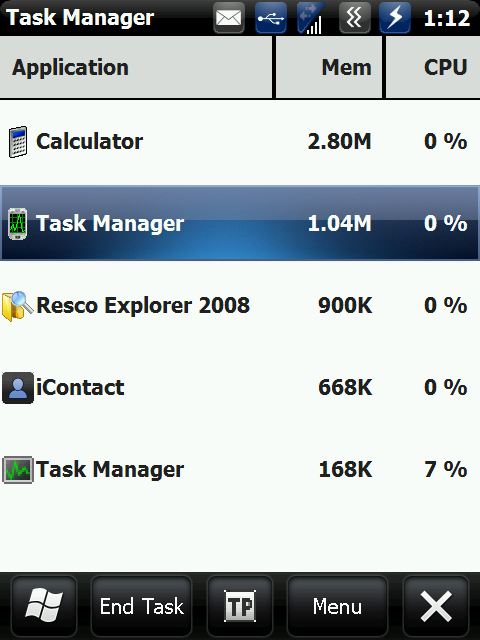
I just want to make it absolutely clear that it does NOT use 1MB of RAM, that's the other one.


taskmgr only uses between 150-170K even if it's mapped (as mine happens to be), so it's very Verizon-friendly.
There are three.
We have the dotTaskMgr, taskmgr and PHM Task Manager.

The one you have posted pics is the dotTaskMgr.

PHM Task Manager opens with the reg editor and has more options still.

While the two posted do look the same they are using different processes.
The first time I tried the one you use I did indeed have 1 meg in use with it.
After reset in started with 540k and dropped lower.

So while you may be correct on the ram usage it still doesn't make much since to do all those steps just to have a few more options.
The default will close apps and view apps and processes.
Why is there a need to go through all the extra steps?

All you really had to do was change the long key to Task Manager instead of making the shortcut and all those steps.
TaskMgr is the default task manager for WM BTW. It is version 3.1
I have gone between both with the long key and tested them all.

Again there is no need to make a shortcut for an app that is already in the windows folder and already on the long key press list.
That just complicates it more for people.
Just choose it from the list and there ya go.

I am not going to argue.
If you like it and want to go through all the needless steps feel free.

Last edited by rootlinux; 11-12-2009 at 07:57 PM.
Reply With Quote
 

  PPCGeeks > Windows Mobile > WM HTC Devices > HTC Touch Pro > CDMA TP Development

Tags
empirom, rom, tellme, touch pro, windows mobile 6.5


Posting Rules
You may not post new threads
You may not post replies
You may not post attachments
You may not edit your posts

BB code is On
Smilies are On
[IMG] code is On
HTML code is Off
Trackbacks are On
Pingbacks are On
Refbacks are On


All times are GMT -4. The time now is 12:34 AM.


Powered by vBulletin® ©2000 - 2025, Jelsoft Enterprises Ltd.
Content Relevant URLs by vBSEO 3.6.0
©2012 - PPCGeeks.com