


 04-16-2010, 08:53 PM
|
||||
|
||||
|
Re: Post Your Touch Pro 2 Home Screen
Would anyone have the cab for colored calender icon on the homepage...I searched with no results ???

|


|
04-16-2010, 08:55 PM
|
||||
|
||||
|
Re: Post Your Touch Pro 2 Home Screen
Quote:
|



| This post has been thanked 1 times. |
|
04-16-2010, 09:08 PM
|
||||
|
||||
|
Re: Post Your Touch Pro 2 Home Screen
Quote:
right here http://forum.xda-developers.com/showthread.php?t=642832   i made a white one to check the end of that thread 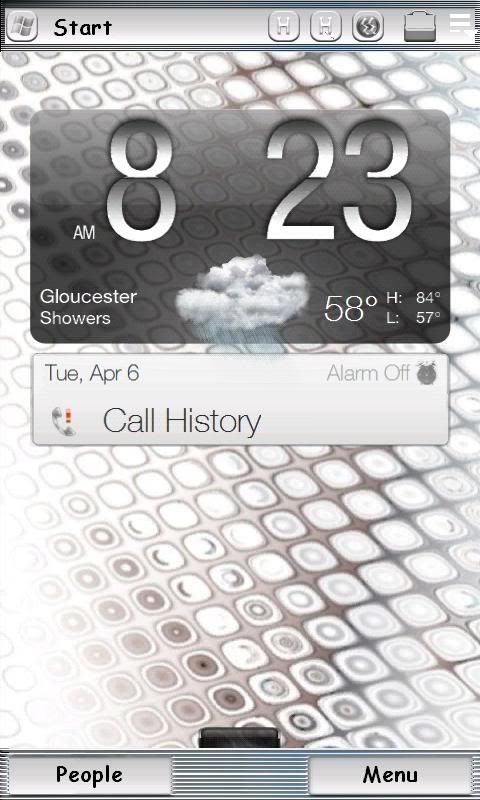
__________________
If i Helped In Anyway Follow Me On Twitter http://twitter.com/#!/maxtcee
Last edited by maxtcee; 04-16-2010 at 09:11 PM.
|

| This post has been thanked 4 times. |
|
04-16-2010, 11:19 PM
|
||||
|
||||
|
Re: Post Your Touch Pro 2 Home Screen
Quote:
Could you tell me how did you put 3 shortcuts at the bottom? The standard SPB Mobileshell allows only the launcher and contact short here. How did you put file explorer in the middle? It's really nice. I really would like to know. Thanks!
|


|
04-17-2010, 12:31 AM
|
||||
|
||||
|
Re: Post Your Touch Pro 2 Home Screen
Quote:
Quote:
I am only trying to change 4 icons. Pandora, WM player, file explorer, and comm manager. The only icon that will change is Pandora. I even replaced the other 3 icons in the windows folder with these. They are showing in the start menu, the selector, but not the home page. Any suggestions? I even removed the quick links and picked the 3d cube ones. They still do not show on the home screen. I have read the read me file at least 10 times. I have tried hiding original icons. What am I missing?
__________________
  Last edited by badb4c; 04-17-2010 at 01:05 AM.
|

|
04-17-2010, 01:36 AM
|
||||
|
||||
|
Re: Post Your Touch Pro 2 Home Screen
Quote:
All icons you have changed will be recreated.  If that doesn't do it, copy your png icon files to folders (preferably to where each app is installed) and then do the icon changes by changing the "Icon" registry entries @ HKLM\Security\Shell\StartInfo\Start, Or try a different icon changer program. CSMI or reStart maybe.
__________________
|




| This post has been thanked 1 times. |
|
04-17-2010, 01:47 AM
|
||||
|
||||
|
Re: Post Your Touch Pro 2 Home Screen
Quote:
I need to make a new hd wall background, it's pretty sophomoric, but I liked the colors/matched what I am going for (blue). It was my first try. Anyway, this is what it looks like, for now.   
Last edited by badb4c; 04-17-2010 at 02:13 AM.
|
|
04-17-2010, 03:12 AM
|
||||
|
||||
|
Re: Post Your Touch Pro 2 Home Screen
Quote:
|

| This post has been thanked 1 times. |
|
04-17-2010, 04:28 AM
|
||||
|
||||
|
Re: Post Your Touch Pro 2 Home Screen
Quote:
Quote:
__________________
Phone: Nexus 6p | Carrier: StraightTalk Att
Kernel: Stock | ROM: Stock Oreo
|

 |
|
«
Previous Thread
|
Next Thread
»
|
|

All times are GMT -4. The time now is 03:59 PM.


