PPCGeeks Forums HTC Arrive HTC HD2 HTC Thunderbolt HTC Touch Pro 2 HTC Evo 4G HTC Evo 3D Samsung Galaxy S II Motorola Droid X Apple iPhone Blackberry
Go Back   PPCGeeks > Windows Mobile > WM HTC Devices > HTC Touch Pro

Notices


Reply
 
LinkBack Thread Tools Display Modes
  #1 (permalink)  
Old 02-04-2009, 02:58 PM
eenieMINI's Avatar
Still a Geek
Offline
Pocket PC: GalaxyS Fascinate; Bold 9650 on the shelf incase!
Carrier: VZW/Sprint
Location: California
 
Join Date: Apr 2007
Posts: 2,691
Reputation: 4570
eenieMINI should be added to the payroll for their contributionseenieMINI should be added to the payroll for their contributionseenieMINI should be added to the payroll for their contributionseenieMINI should be added to the payroll for their contributionseenieMINI should be added to the payroll for their contributionseenieMINI should be added to the payroll for their contributionseenieMINI should be added to the payroll for their contributionseenieMINI should be added to the payroll for their contributionseenieMINI should be added to the payroll for their contributionseenieMINI should be added to the payroll for their contributionseenieMINI should be added to the payroll for their contributions
Mentioned: 0 Post(s)
Tagged: 0 Thread(s)
Re: changing hi-light colours

To also change the enlarged start menu and the taskmanager. Those are reg tweaks..

HKLM\Software\HTC\EnlargeMenu
edit ManiliaCustomHlDown and ManilaCustomHlUp (you can vary the color degree to give it a gradient look by using two slightly off colors)

For the taskmanager edit
HKCU\Software\HTC\TaskManager
same two keys

Use this website and use the "access code" numbers rather than hex/decimal and you'll have the exact colors without error.
http://cloford.com/resources/colours/namedcol.htm
Reply With Quote
This post has been thanked 6 times.
  #2 (permalink)  
Old 02-04-2009, 03:05 PM
darren.wlsn1's Avatar
acs tester
Offline
Pocket PC: diamond/tp1/tp2/MoFo/touch 4g
Carrier: ppcgeeks/sprint
Location: pa
 
Join Date: May 2008
Posts: 24,870
Reputation: 51195
darren.wlsn1 can't get a higher reputation leveldarren.wlsn1 can't get a higher reputation leveldarren.wlsn1 can't get a higher reputation leveldarren.wlsn1 can't get a higher reputation leveldarren.wlsn1 can't get a higher reputation leveldarren.wlsn1 can't get a higher reputation leveldarren.wlsn1 can't get a higher reputation leveldarren.wlsn1 can't get a higher reputation leveldarren.wlsn1 can't get a higher reputation leveldarren.wlsn1 can't get a higher reputation leveldarren.wlsn1 can't get a higher reputation level
Mentioned: 14 Post(s)
Tagged: 0 Thread(s)
Send a message via AIM to darren.wlsn1 Send a message via MSN to darren.wlsn1 Send a message via Yahoo to darren.wlsn1 Send a message via Skype™ to darren.wlsn1
Re: changing hi-light colours

Quote:
Originally Posted by eenieMINI View Post
To also change the enlarged start menu and the taskmanager. Those are reg tweaks..

HKLM\Software\HTC\EnlargeMenu
edit ManiliaCustomHlDown and ManilaCustomHlUp (you can vary the color degree to give it a gradient look by using two slightly off colors)

For the taskmanager edit
HKCU\Software\HTC\TaskManager
same two keys

Use this website and use the "access code" numbers rather than hex/decimal and you'll have the exact colors without error.
http://cloford.com/resources/colours/namedcol.htm
huge +1 you helped me tweak my colors with your instructions. thanx again
Reply With Quote
  #3 (permalink)  
Old 02-04-2009, 03:14 PM
darren.wlsn1's Avatar
acs tester
Offline
Pocket PC: diamond/tp1/tp2/MoFo/touch 4g
Carrier: ppcgeeks/sprint
Location: pa
 
Join Date: May 2008
Posts: 24,870
Reputation: 51195
darren.wlsn1 can't get a higher reputation leveldarren.wlsn1 can't get a higher reputation leveldarren.wlsn1 can't get a higher reputation leveldarren.wlsn1 can't get a higher reputation leveldarren.wlsn1 can't get a higher reputation leveldarren.wlsn1 can't get a higher reputation leveldarren.wlsn1 can't get a higher reputation leveldarren.wlsn1 can't get a higher reputation leveldarren.wlsn1 can't get a higher reputation leveldarren.wlsn1 can't get a higher reputation leveldarren.wlsn1 can't get a higher reputation level
Mentioned: 14 Post(s)
Tagged: 0 Thread(s)
Send a message via AIM to darren.wlsn1 Send a message via MSN to darren.wlsn1 Send a message via Yahoo to darren.wlsn1 Send a message via Skype™ to darren.wlsn1
Re: changing hi-light colours

you can tweak the color to whatever you want, mine is a combo of blue/silver. eenie, check out the today, settings, and programs icons in start menu, did you get them yet?
Reply With Quote
This post has been thanked 1 times.
  #4 (permalink)  
Old 02-04-2009, 08:53 PM
eenieMINI's Avatar
Still a Geek
Offline
Pocket PC: GalaxyS Fascinate; Bold 9650 on the shelf incase!
Carrier: VZW/Sprint
Location: California
 
Join Date: Apr 2007
Posts: 2,691
Reputation: 4570
eenieMINI should be added to the payroll for their contributionseenieMINI should be added to the payroll for their contributionseenieMINI should be added to the payroll for their contributionseenieMINI should be added to the payroll for their contributionseenieMINI should be added to the payroll for their contributionseenieMINI should be added to the payroll for their contributionseenieMINI should be added to the payroll for their contributionseenieMINI should be added to the payroll for their contributionseenieMINI should be added to the payroll for their contributionseenieMINI should be added to the payroll for their contributionseenieMINI should be added to the payroll for their contributions
Mentioned: 0 Post(s)
Tagged: 0 Thread(s)
Re: changing hi-light colours

Quote:
Originally Posted by darren.wlsn1 View Post
.... eenie, check out the today, settings, and programs icons in start menu, did you get them yet?
No! Whats that about? Link?
Reply With Quote
  #5 (permalink)  
Old 02-04-2009, 09:05 PM
eenieMINI's Avatar
Still a Geek
Offline
Pocket PC: GalaxyS Fascinate; Bold 9650 on the shelf incase!
Carrier: VZW/Sprint
Location: California
 
Join Date: Apr 2007
Posts: 2,691
Reputation: 4570
eenieMINI should be added to the payroll for their contributionseenieMINI should be added to the payroll for their contributionseenieMINI should be added to the payroll for their contributionseenieMINI should be added to the payroll for their contributionseenieMINI should be added to the payroll for their contributionseenieMINI should be added to the payroll for their contributionseenieMINI should be added to the payroll for their contributionseenieMINI should be added to the payroll for their contributionseenieMINI should be added to the payroll for their contributionseenieMINI should be added to the payroll for their contributionseenieMINI should be added to the payroll for their contributions
Mentioned: 0 Post(s)
Tagged: 0 Thread(s)
Re: changing hi-light colours

Quote:
Originally Posted by darren.wlsn1 View Post
huge +1 you helped me tweak my colors with your instructions. thanx again
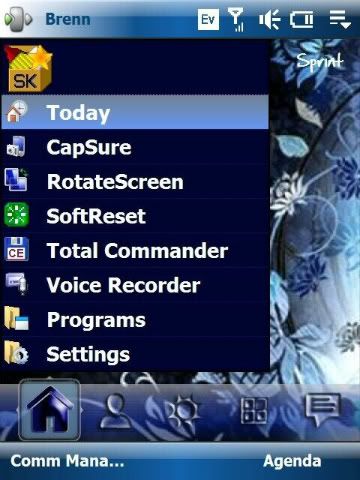
You can also edit those dotted lines out... use a color corresponding to your background png.. the background png is in your windows folder "pattern_2_2.png"
registry area same for both .. key to edit ManilaCustomGrid .... same with ManilaCustomText if you want font color and ManilaCustomTexture points to the pattern_2_2.png file.. so conceivably you can point to whatever.. I just edit the file instead.

Last edited by eenieMINI; 02-04-2009 at 09:20 PM.
Reply With Quote
This post has been thanked 1 times.
  #6 (permalink)  
Old 02-04-2009, 03:56 PM
chas123's Avatar
Halfway to VIP Status
Offline
Pocket PC: EVO
Carrier: Sprint
Location: Virginia
 
Join Date: Oct 2008
Posts: 509
Reputation: 1030
chas123 is halfway to VIP status based on repchas123 is halfway to VIP status based on repchas123 is halfway to VIP status based on repchas123 is halfway to VIP status based on repchas123 is halfway to VIP status based on repchas123 is halfway to VIP status based on repchas123 is halfway to VIP status based on repchas123 is halfway to VIP status based on rep
Mentioned: 0 Post(s)
Tagged: 0 Thread(s)
Re: changing hi-light colours

Quote:
Originally Posted by eenieMINI View Post
To also change the enlarged start menu and the taskmanager. Those are reg tweaks..

HKLM\Software\HTC\EnlargeMenu
edit ManiliaCustomHlDown and ManilaCustomHlUp (you can vary the color degree to give it a gradient look by using two slightly off colors)

For the taskmanager edit
HKCU\Software\HTC\TaskManager
same two keys

Use this website and use the "access code" numbers rather than hex/decimal and you'll have the exact colors without error.
http://cloford.com/resources/colours/namedcol.htm

Awesome link. Thanks
Reply With Quote
Reply

  PPCGeeks > Windows Mobile > WM HTC Devices > HTC Touch Pro

Thread Tools
Display Modes

Posting Rules
You may not post new threads
You may not post replies
You may not post attachments
You may not edit your posts

BB code is On
Smilies are On
[IMG] code is On
HTML code is Off
Trackbacks are On
Pingbacks are On
Refbacks are On


All times are GMT -4. The time now is 09:13 AM.


Powered by vBulletin® ©2000 - 2026, Jelsoft Enterprises Ltd.
Content Relevant URLs by vBSEO 3.6.0
©2012 - PPCGeeks.com