Quote:
Originally Posted by Edwood

Very simple and cheap to fix. All it takes is tape. (I used blue painters tape)
- Squeeze your Touch Pro and take note of where exactly it "clicks" or "creaks".
- Remove battery cover.
- Apply strips of tape on the inside of the battery cover where the creaks are. (basically a mirror image of the underside of the Touch Pro, this is where the inside of the battery cover will meet the underside of the Touch Pro when you put the battery cover back on.)
- Install battery cover.
- Squeeze again. Any more creaks still, take note of where they are.
- Remove battery cover.
- Apply another strip of tape where the creaks still are. It may take another layer or two until the creaking stops. I've noticed the biggest offender is the area around the Micro SD slot, as it's the biggest gap / void space under the battery door. ( it took two layers of tape for mine to stop creaking near the micro SD slot area.)
Now, enjoy the silence. 
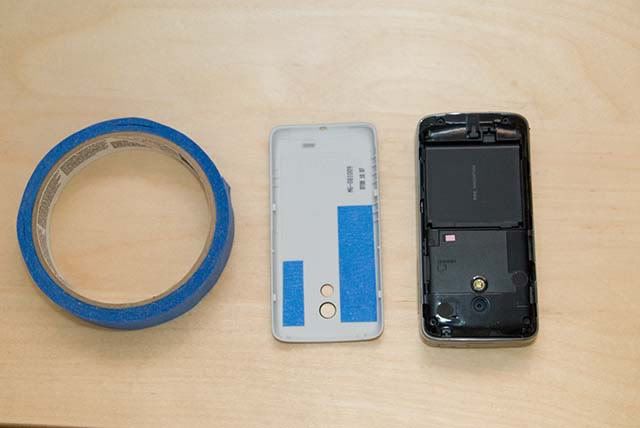
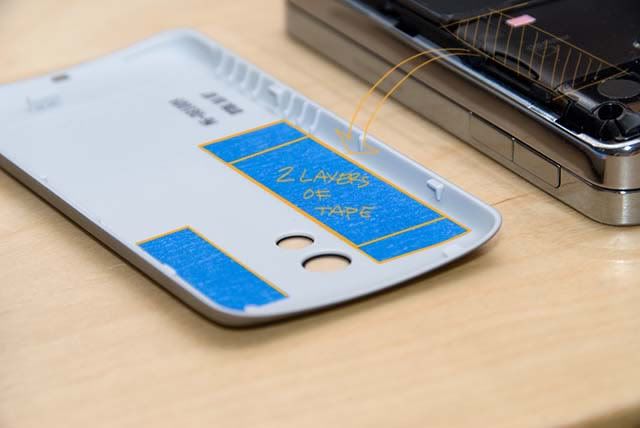
Oh, and an added benefit is tape like painters tape has a less grippy surface, so it's actually easier for me to remove and replace the battery cover now.
-Ed |
Fantastic solution, and easy to assemble! Thanks!
BTW, what program did you use to notate your images? It looks like you used a freekin' WACOM!