


 03-31-2009, 09:22 AM
|
||||
|
||||
|
CHome/Titanium Modifications - Adding Panels
This thread was created so that the various 6.5 ROM threads don't get unnecessarily cluttered. For those of you that do not know what this is, CHome/Titanium is the default Today plug-in in WM 6.5. All credit goes to the developers over at XDA (showaco, lpaso, tlogix, drkfngthdragnlrd). I'm just the messenger here, they've done all of the hard work.
Everything posted here is confirmed working on 21500 builds of 6.5. Titanium Weather Updated 4/14/09: Version 3a released. Original Thread: http://forum.xda-developers.com/show...51#post3304751 (Released by showaco) *Note: Showaco's version is for VGA. QVGA users can get Titanium Weather from mnemonique here. Installation and Setup Instructions:
Titanium Customizer Original Thread: http://forum.xda-developers.com/showthread.php?t=497232 (released by lpaso) This gives you the ability to change the order of your panels and enable/disable them. It's pretty straightforward to use. Instructions:
CHome Configurator Original thread: http://forum.xda-developers.com/showthread.php?t=393104 (released by tlogix) This program was designed for Smartphones, so it does not work completely. You can use this program, along with a couple of other edits to create your own custom panels. Please note that there are some limitations. Detailed instructions on creating your own custom Panels can be found in post 2. The following instructions are just an example of how this program works. I repeat, this is just an example. Instructions:
__________________
If you are new to the site, take a look at the PPCGeeks New User Guide to get an overview of how to use the forums.
Having problems finding what you're looking for? Here are some tips on how to search the site more effectively. Last edited by Big D5; 05-07-2009 at 09:33 PM. |


| This post has been thanked 51 times. |
|
03-31-2009, 09:23 AM
|
||||
|
||||
|
Re: CHome/Titanium Modifications
How to Add a New Panel
*Thanks to showaco* ***Note: If you have Titanium Weather Version 3, you can leave out the steps listed below regarding copying .cpr files*** You have the ability to add new panels to CHome, however there are limitations. To add new panels, you will need to have CHome Configurator installed (read the first post and familiarize yourself with this program). These instructions might sound complicated at first, but I assure you it is relatively simple. Please read through this entire post carefully and pay attention to the details. Basically, you can create 3 custom panels pretty easily using information that exists for panels that are not utilized by default in Titanium. You will be using either the CLinks, CWelcomeCenter, and/or Settings panels to create your new custom ones. I will break down how to use each of these: How to Add a Panel Using "CLinks"
How to Add Panel Using "CWelcomeCenter"
How to Add Panel Using "Settings"
How to Edit a Panel You Created Using the GUID from CWelcomeCenter or Settings
Last edited by Hafrust; 04-15-2009 at 11:08 PM. |
| This post has been thanked 11 times. |
|
03-31-2009, 09:24 AM
|
||||
|
||||
|
Re: CHome/Titanium Modifications
FYI....Showaco has posted an Opera panel cab that is in testing stages. Check it out here. I'm not going to post the cab since it's still listed as "for testing". I installed it on my phone and it works fine, but it has not been tested on all versions of Opera. QVGA users can find info on how to get this working on your device in this post (thanks to drkfngthdragnlrd). Here's a peek:
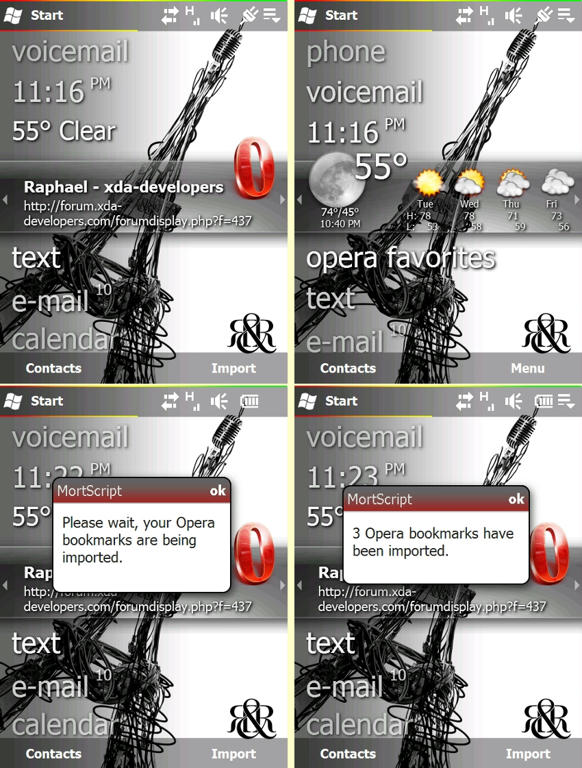 Also, anyone up to his challenge? Quote:
Last edited by Hafrust; 04-14-2009 at 02:13 PM. |

| This post has been thanked 4 times. |
|
03-31-2009, 10:13 AM
|
||||
|
||||
|
Re: CHome/Titanium Modifications
This is great Hafrust.
So I have added Opera to the launcher and think it is great to have an editable "Favorites" setup but I wish we were able to add new panels. Thanks for putting this together for us all.
__________________
Phone: Touch Pro 2 (Sprint)
Bluetooth: MotoROKR S9 |

|
03-31-2009, 10:16 AM
|
||||
|
||||
|
Re: CHome/Titanium Modifications
Im trying to figure out how to add the comm manager to chome
__________________
Rooted Sprint EVO 4G 1.32.651.6
Radio: 1.39.00.05.31 OMJ EVO 2.1 Eclair v1.2 "My next move be my best move" |

|
03-31-2009, 11:06 AM
|
||||
|
||||
|
Re: CHome/Titanium Modifications
Quote:
|
|
03-31-2009, 12:46 PM
|
||||
|
||||
|
Re: CHome/Titanium Modifications
Quote:
|
|
03-31-2009, 01:23 PM
|
||||
|
||||
|
Re: CHome/Titanium Modifications
great thread idea Haf!
__________________
Creator of iLife ROM Series  Best... Member... Ever...  |

| This post has been thanked 1 times. |
|
03-31-2009, 01:59 PM
|
||||
|
||||
|
Re: CHome/Titanium Modifications
Has anyone been able to get their contact pictures to show up when using a contact dialer?
__________________
Treo 650 > PPC 6700 > PPC 6800 > Touch Diamond
|

|
03-31-2009, 02:55 PM
|
||||
|
||||
|
Re: CHome/Titanium Modifications
Great thread... I'm definitely going to look this all up in detail and set it up on my phone. Thank you for this useful information..!!
|
| This post has been thanked 1 times. |
 |
|
«
Previous Thread
|
Next Thread
»
|
|

All times are GMT -4. The time now is 09:08 AM.


