Yeah, this has been done to death on other sites, yet I find them incredibly useful to learn about new plugins, settings and style.
So post your pics here along with a description/as much info about your setup so other can emulate if they want!
To
capture images, just use the free
GetPDAScreen (or see below for attachment) or if u wanna take a screenshot via ur ppc see this
thread.
-----------------------------------------------------------------------------
And without further ado...here's mine (for this week, lol):
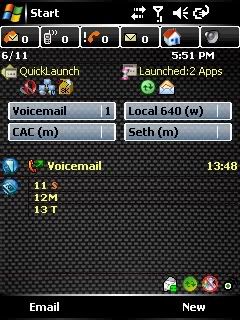
From the top:
PhoneAlarm Lite 1.5 w/Carbon Fiber Skin
DevState 1.4
700W SpeedDial Plugin
ScaryBear Spacer (adds space between plugins)
O2 Plus: Last Call
O2 Plus: Calendar
At the bottom those 4 icons are as follows:
VGSMail (push email client/transport)
Softick Card Export II (make your phone a mass-USB device)
SmartFilter Pro (call blocker/filter)
Connection Manager (duh, lol)
The two Soft Keys are:
Email: Mapped to Pocket Outlook for easy access
New:
NewMenu which is quick access to new sms, email, docs, etc.
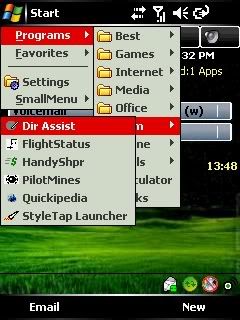
Finally, this is what running
SmallMenu Plus, a cascading stat menuu program, allows easy 1-handed navigation to all things on your device, including IE favorites: