If you are using the
Rhodium Keyboard Controller and mapped your Messaging, or some other keyboard, key to the "Control" function, consider the following:
Remap the Fn+C, Fn+X, and Fn+V keys to their own values (C, X, and V) but also check the Ctrl checkbox for those mappings. Then to use Copy, Cut, and Paste you simply use Fn+C, or Fn+X, or Fn+V. This is much cleaner and when you think about it logical.
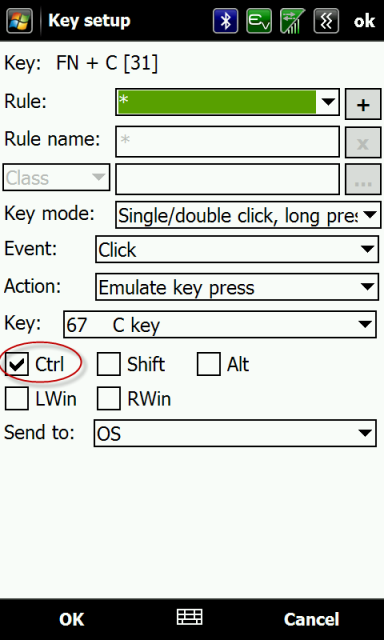
You can then restore the original functionality of the Messaging key, or whatever key you remapped to Control.
You can also do this with the Left and Right arrows. Fn+Left and Fn+Right arrow will then move the cursor to the previous or next word. Works great in Messaging, or anywhere else you might type. Of course in this case you loose the FN actions originally mapped to those keys, but in my case (Telus) that's just the browser and comm manager. Personally I can't recall a time I launched them from the keyboard shortcut.
Unfortunately I can't take credit for this one. I too had mapped the Messaging key to the Control function, until another member,
csper, clued me into this somewhere
else.